Compare three implementations, then follow the matching setup route.
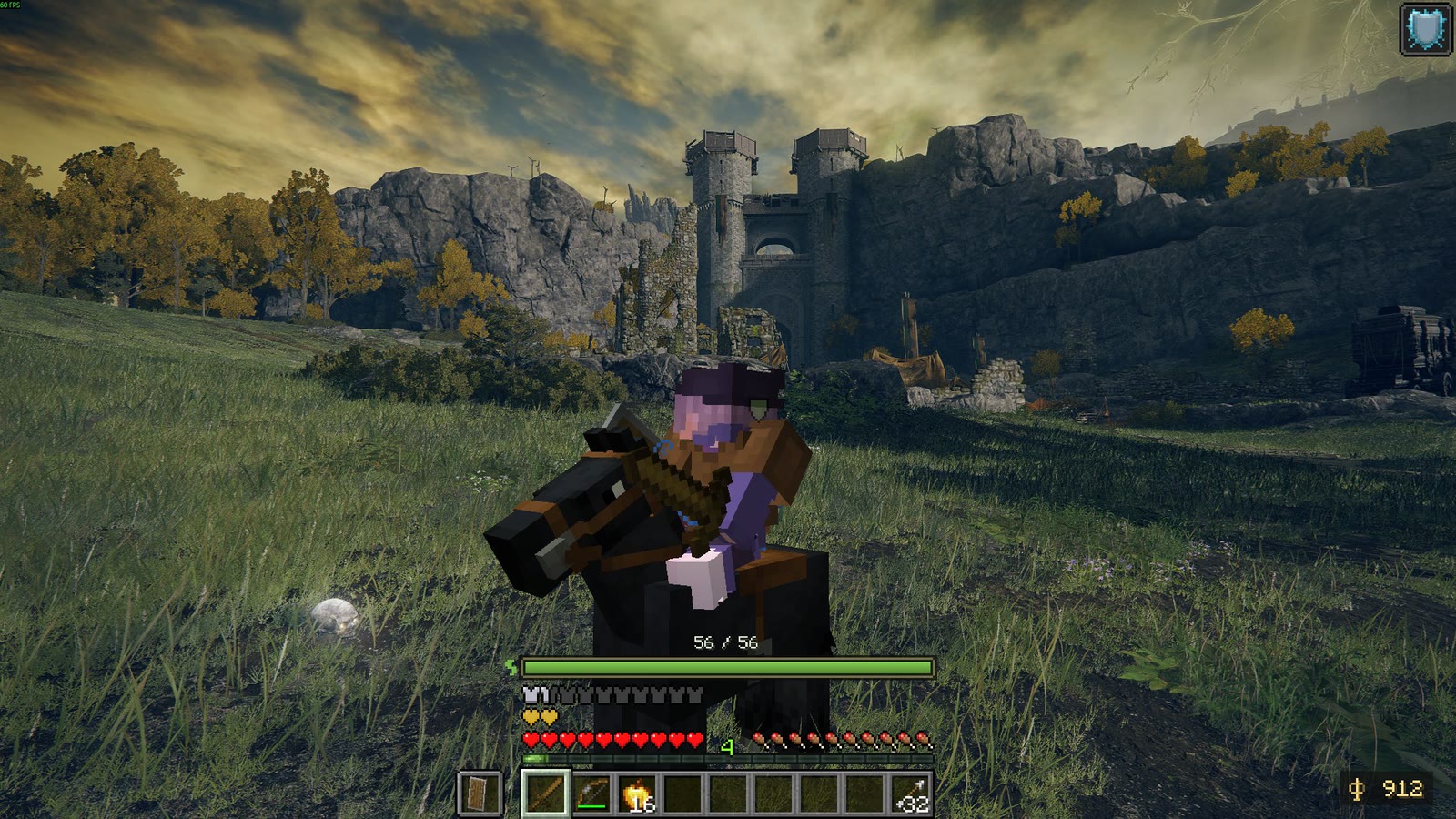
EldenCraft v0.25.5: Minecraft’s rider and hotbar in Elden Ring’s world.
Screenshot by SocketByte, not our play test. Tap the image for full size.
Offline PC mods, not browser games. We checked the documentation;
we have not installed or played these builds. On a phone or console?
Browse different browser games; these sources do not establish a version for that environment.
Choose by what you want to do
EldenCraft vs Minecraft Ring vs the Mac bridge
Similar-looking scenes can come from different projects. Choose by the feature and setup you need.
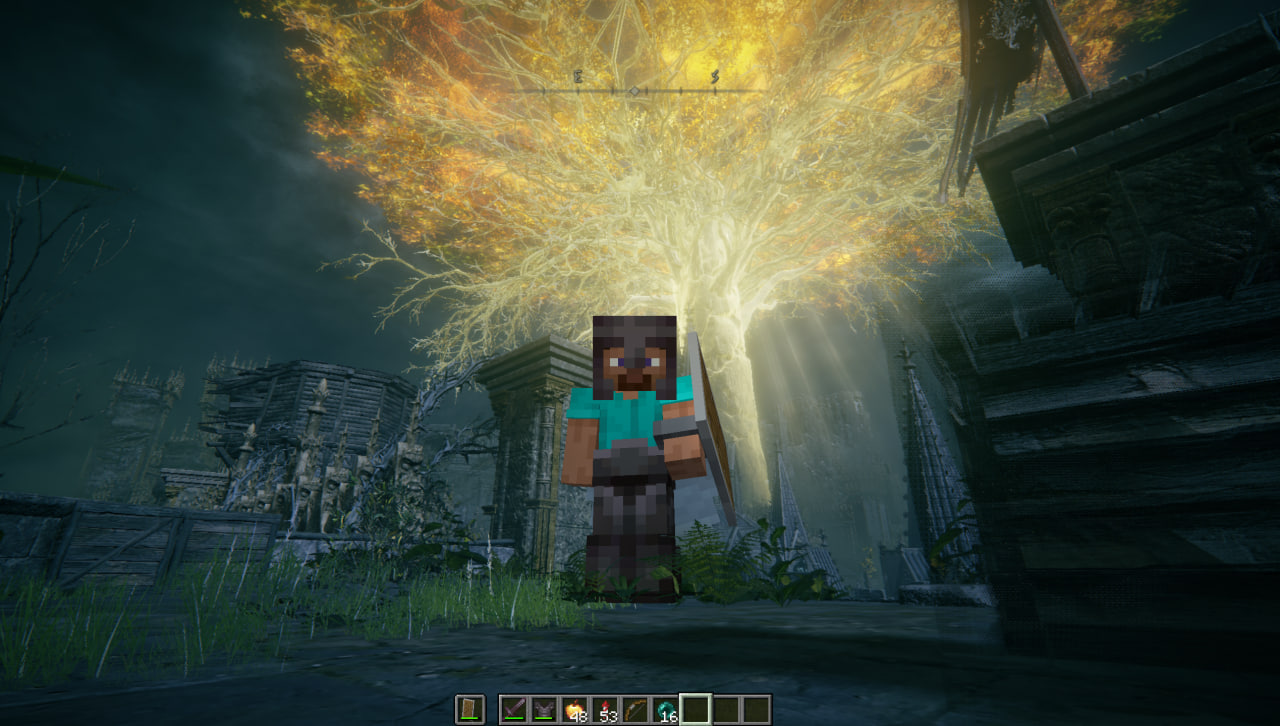
Minecraft Ring 0.3.0: Steve in the center, Elden Ring’s scene behind him, Minecraft’s hotbar below.
Screenshot by siddoff. This is not a Mac screenshot.
Mine Elden Ring’s own ground?
EldenCraft’s author documents it. Minecraft Ring can break placed Minecraft blocks, but not the native ground.
Use a packaged Windows setup?
EldenCraft has a release ZIP. Ring offers a source workflow or a separate Melty launch route.
Run it on an Apple Silicon Mac?
Use justbustin’s Mac bridge and CrossOver instructions. The Windows ZIP is a different route.
Compare exact game versions, progression and limits
Gameplay differences at the checked source versions; full requirements follow in each setup route.
The author describes mining native surfaces for materials, including dirt and stone.
Place and break Minecraft blocks. Elden Ring’s native ground cannot be mined.
Samples native collision into invisible Minecraft blocks so you can walk and build in the host world.
Progression
Survival world, boss rewards, rune shops and a Nether portal system are documented.
The bridge world starts in creative mode. Survival enables incoming damage; Nether/End progression is not integrated in the checked author discussion.
Creative/survival bridge world. The checked README does not document EldenCraft’s campaign or Nether features.
Limits to consider
Early alpha. Native enemies do not pathfind around your Minecraft walls; HDR is unsupported. The author says boss difficulty and the economy still need full-playthrough testing.
Experimental offline single-player. Terrain sampling, fast travel, lifts and rendering need wider testing; multiplayer is unverified.
Elden Ring runs through CrossOver while Minecraft runs natively. Windows release steps are not Mac installation instructions; other environments are unverified here.
For the checked Ring and Mac source builds, Elden Ring is App Ver. 1.17.1 / executable 2.7.1.0.
EldenCraft v0.25.5 also targets executable 2.7.1.0. A future game update needs matching project documentation;
do not assume compatibility. See the exact source baselines.
Get the right files from the right creator
Start with your project’s setup route
Use your own copies of the games. Each route below summarizes its author’s instructions. Keep your own save
backups and use the documented offline launcher; we have not tested installation, file safety or recovery.
Start with the author’s Windows ZIP if you want a packaged setup route.
Follow this order
Extract the entire release ZIP
Get v0.25.5 from the author. Use a writable local folder and keep its files together, as shown in the diagram below.
Sign in to Steam; close both games
Keep your own saves. The author documents a separate EldenCraft.sl2 save and automatic backups; we have not tested recovery.
Run EldenCraft.cmd
It downloads portable Java, Prism, me3 and ReShade, then starts both games. The ZIP size is not the total download.
Sign in to Minecraft, then connect
Complete Microsoft sign-in in Prism and close Prism. Minecraft joins its dedicated world; load an Elden Ring character to connect.
Documented result: A dedicated Minecraft survival world connected to your Elden Ring character. Online Elden Ring or Minecraft LAN/server sessions disable the bridge.
Updating EldenCraft and keeping saves
To update, extract the new matching release into its own folder and run its EldenCraft.cmd. The documented runtime and worlds live in %LOCALAPPDATA%\EldenCraft, unless you set a different data directory. Read the new release notes before reusing this baseline.
Choose the Windows port if you want its source workflow or the creator’s Melty listing.
Follow this order
Prepare the source toolchain
Follow the author’s .tools layout for LLVM-MinGW, JDK 25 and Gradle 9.7.1. This upstream source has no packaged installer.
Build, then run Install.ps1
Use your actual Elden Ring directory. The installer backs up saves and moves recognized mods; keep installation.json with its original backups.
Open start.bat or Play.bat
Sign in to Steam, keep the launcher console open and choose Continue in Elden Ring. Minecraft should open ER Bridge.
Keep Minecraft windowed
Do not add Borderless Fullscreen or b100lib. A new world is creative; use /gamemode survival for incoming enemy damage.
Documented result: The local ER Bridge world connected to the host player, with both processes running. This source route is an offline development-client workflow, not an ordinary Minecraft modpack installation.
Updating or removing Minecraft Ring
For updates, close both games, rebuild both sides at the same revision and follow the author’s DLL-copy instructions. Do not routinely rerun Install.ps1: it replaces the installation record. Restore.ps1 restores recorded mod files, not save backups; Minecraft worlds remain on disk.
Prefer a launcher route? The creator’s Minecraft Ring listing on Melty uses Melty’s launch flow and first-run Minecraft sign-in. Follow that listing instead of the source-build steps above.
We have not matched its current package to the pinned source revision.
What about the SIGF package?
SIGF’s packaging notes identify Ring 0.3.0 / 711015a and state that
SIGF built the binaries and had not played that exact package. This is another access channel for Ring, not a fourth
independently verified implementation. We have not installed either launcher.
Use the Mac-specific bridge instructions if you have an Apple Silicon Mac and CrossOver.
Follow this order
Prepare the Elden Ring bottle
Use the author’s CrossOver / D3DMetal settings. Its default bottle name is Elden Ring; other names need configuration.
Build and install the bridge
After preparing the listed tools, run elden-ring/scripts/install_er_bridge.sh from the repository root.
Launch Elden Ring offline
Sign in to Steam in the bottle. Use Launch Elden Ring + Minecraft bridge.command and load your save.
Start native Minecraft
Run elden-ring/scripts/run_minecraft.sh. It should open ER Bridge and take over controls. Keep both games running.
Documented result: Native macOS Minecraft over the Windows Elden Ring scene in CrossOver. The checked Elden Ring README caps in-game composition at 1920 × 1200; larger windows fall back to a separate overlay.
Updating or removing Minecraft Crossover Bridge
Keep your own saves before installing or changing the bridge. The author documents elden-ring/scripts/install_er_bridge.sh --remove to undo the bridge installation. Consult the Mac repository for updates; neither Windows Restore.ps1 nor EldenCraft’s runtime-folder rules apply here.
EldenCraft uses M / G for the map; Ring and the Mac bridge use F8 to hand over control.
Open your project’s key list below.
EldenCraft
R
Elden Ring interactions: doors, ladders, items and Sites of Grace.
E
Minecraft inventory.
Y
Summon or dismiss Torrent where Elden Ring permits it.
M / G
Open Elden Ring’s map; Minecraft hides until it closes.
F5
Cycle first-person and third-person views.
Use the release’s menu controls. Do not substitute Minecraft Ring’s F8 handoff instructions. F6 toggles composition; F11 toggles the ReShade compositor. Author’s controls ↗
Minecraft Ring
R
Elden Ring interactions.
E
Minecraft inventory.
F8
Hand controls to Elden Ring for its menus, then back to Minecraft. Release the key between presses.
F5
Cycle first-person and third-person views.
Creative mode explains why enemies may not hurt you. Use /gamemode survival for damage, or /gamemode creative to switch back. Author’s controls ↗
Minecraft Crossover Bridge
R
Elden Ring interactions.
E
Minecraft inventory.
F8
Switch keyboard and mouse between Minecraft and Elden Ring’s menus.
Creative mode is the initial bridge state. The author documents /gamemode survival for incoming damage. Check Mac function-key settings before diagnosing F8. Author’s controls ↗
Identify the project before the symptom
When setup or gameplay does not behave as expected
Start with the matching project below. These are author-documented checks or clearly marked unresolved reports;
they are not fixes we reproduced on a gaming PC.
EldenCraftThe launcher rejects Elden Ring’s version
Check the executable’s product version against 2.7.1.0 for this release. A matching game/release pair is required; this page does not establish compatibility with a newer game update.
Complete Microsoft sign-in in Prism and then close it to continue. For missing release files, extract the entire ZIP to a writable local folder, with scripts, config and payload beside EldenCraft.cmd. The author provides a check option for release files and compatibility.
The author says to keep Minecraft unminimized and put both games on the same GPU. EldenCraft.cmd -CpuFrames selects shared-memory frames if GPU sharing fails. These are project-specific author suggestions, not a fix we reproduced.
Focus Elden Ring, release F8, then press it again. Verify both bridge processes are still alive. Keep Minecraft windowed rather than adding the removed fullscreen dependencies.
Check the compiler under .tools/compiler, JDK 25 and Gradle 9.7.1 paths. The first Fabric build needs network access to obtain dependencies before offline builds can work. Inspect the launcher console rather than using EldenCraft’s ZIP instructions.
A player reported this in the author’s Reddit thread, but the reply did not establish a fix. We have not reproduced it. Save your game and bridge versions, triggering movement, GPU/driver details and both logs; report the issue to siddoff rather than assuming a universal repair exists.
The author gives two alternatives after a ZIP download: right-click the included launcher and choose Open, or use elden-ring/scripts/launch_er.sh from Terminal. Check the Mac README and your D3DMetal/macOS configuration before following Windows instructions.
Mac bridge: native log /tmp/ermc/er-bridge.log and Minecraft log elden-ring/mc-bridge/run/logs/latest.log.
Use its Elden Ring README.
Include the action that triggers the problem and GPU/driver details. Review logs for personal information before posting them publicly.
A clip is not a package identity
The original video and the later projects
justbustin’s Mac bridgeCredits Tobyn’s idea; describes its own implementation.
↓ documented Windows portsiddoff’s Minecraft RingWindows source; Melty and SIGF provide separate access channels.
Inspiration, not a proven code forkSocketByte’s EldenCraftCredits both projects; has its own release and progression documentation.
Project relationships described by their authors. An “inspired by” credit does not establish identical code, files or compatibility.
“Minecraft In Elden Ring Mod” by Tobyn Jacobs was published on 29 September 2026.
We observed Minecraft’s HUD and an enemy scene near 5 seconds, and an inventory view near 30 seconds.
This identifies the clip. It does not establish that any later download reproduces that exact build.
We did not verify the entire video, its internal implementation or its frame rate. Opening the link loads YouTube; nothing is embedded here.
In the checked projects, both games run together and a bridge coordinates them. That does not mean they share
one physics engine. Read how these game mashup approaches work.
Documentation checked · 15 October 2026
Sources, versions and what remains untested
Edited by Felix. These are the versions behind this comparison, not a claim that they are the latest releases. Check the creator’s
current compatibility notes before installing. We do not host or inspect executable files.
Community questions about installation, multiplayer and movement crashes came from
siddoff’s EldenRingMods thread. Reports of poor and smooth performance
differ; they do not establish an FPS target for your machine. Windows/Mac installation, launcher packages, save recovery,
full campaign completion and download safety have not been tested here.